
Table of Contents


Designing with Data, Not Assumptions
A/B testing is one of the most powerful methods in a designer’s and strategist’s toolkit—not because it promises certainty, but because it provides clarity. It shifts decisions from opinion and instinct to insight and evidence. At its core, A/B testing helps us learn how real people respond to real design choices. It reveals patterns that would otherwise stay hidden beneath assumptions or internal bias.
In today’s fast-moving digital world, filled with distractions and constant change, no one gets everything right the first time. Even experienced professionals can’t always predict how an audience will react to a headline, a button, or a layout. A/B testing provides a structured way to explore these choices in real environments. It helps teams understand not just what works, but why it works. That’s the key difference. Without understanding, success is just luck. With A/B testing, success becomes repeatable.

What Is A/B Testing?
A/B testing, also known as split testing, is a method of comparing two versions of a webpage, user interface, or feature to determine which one performs better against a defined goal. In an A/B test, users are randomly shown either version A (the control) or version B (the variant), and their behaviors are measured to evaluate which design, content, or interaction drives better outcomes.
Rather than relying on subjective opinions or assumptions, A/B testing empowers teams to make data-driven decisions rooted in real user behavior. Whether it’s increasing conversions, improving engagement, or reducing drop-offs, this controlled approach allows designers and strategists to isolate variables and validate changes before full-scale implementation.
In UX and UI design, A/B testing helps ensure that even the smallest adjustments—like button color, headline copy, or page layout—are working to enhance the user experience and support business objectives.

Why A/B Testing Matters in UX/UI Design
Good design is more than aesthetics—it’s functionality, usability, and clarity. A/B testing sits at the intersection of creative vision and measurable performance. It transforms design from guesswork into a process of continuous refinement.
By testing variations directly with real users in live environments, teams can:
-
Reduce friction in user flows
-
Maximize the effectiveness of CTAs
-
Improve satisfaction and task success
-
Align interface decisions with user needs and intent
This process allows teams to optimize not just for visual appeal, but for experience quality. Over time, a culture of testing builds smarter interfaces, improves user trust, and reduces the risk of implementing ineffective or confusing changes.

When to Use A/B Testing
A/B testing is most effective when you’re seeking measurable improvements to user experience, engagement, or conversion—without overhauling an entire system. It excels in scenarios where small adjustments could yield significant results, and where decisions should be guided by user data rather than instinct or internal debate.
Here are common situations where A/B testing is especially valuable:
-
Launching or updating key interface elements
Whether it’s a new CTA design, a hero layout, or a navigation pattern, A/B testing helps validate changes before full rollout.
-
Optimizing conversion funnels
From landing pages to checkout flows, A/B tests can identify where users drop off—and which variations drive better completion rates.
-
Clarifying messaging and content hierarchy
Headlines, subheads, button labels, and microcopy are ripe for testing to see which version improves understanding or action.
-
Improving task success in user flows
If users are getting stuck in a form, confused by an interaction, or abandoning a process, testing different UX patterns can illuminate a better path.
-
Testing assumptions based on feedback or analytics
A/B testing provides a way to turn user complaints or behavioral data into actionable hypotheses.
-
Evaluating risky or unconventional design decisions
When making a bold change, like removing a search bar or consolidating navigation, A/B testing reduces the risk by letting users guide the outcome.
It’s important to note that A/B testing works best when the stakes are meaningful—but the scope is narrow. If you’re redesigning an entire platform, usability testing or design workshops may be more effective upfront. But once the foundation is in place, A/B testing becomes the ongoing tool for refinement, optimization, and growth.


The A/B Testing Process Explained
A successful A/B test doesn’t start with a tool—it starts with a hypothesis. When approached methodically, A/B testing becomes a repeatable, evidence-driven process that reveals what truly resonates with users.
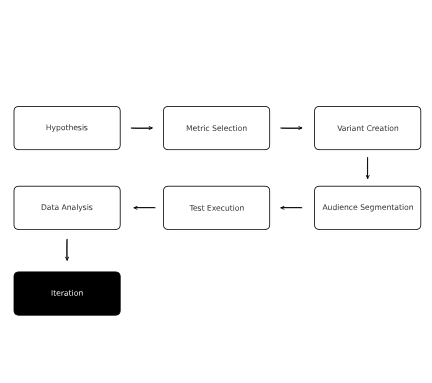
Here’s how to run a well-structured test from beginning to end:
1. Define a Clear Hypothesis
Start with a clear question or assumption:
“We believe that changing [element] will improve [metric] because [reason].”
For example:
“We believe that changing the CTA button from green to red will increase conversions because red draws more attention.”
The strength of your test depends on the clarity of your hypothesis. Avoid vague goals like “see what works better” and aim for specific, measurable objectives.
2. Identify the Right Metric
Choose a primary metric that reflects the success of the change. This could be:
-
Click-through rate (CTR)
-
Form submissions
-
Page dwell time
-
Add-to-cart actions
-
Drop-off rate reduction
This metric should directly align with your hypothesis. Avoid testing too many variables at once or relying on secondary signals that don’t reflect your primary goal.
3. Create Your Variants
You’ll need:
-
Version A (Control): the existing experience
-
Version B (Variant): the new or adjusted design
Keep the change focused. If you test multiple elements at once (e.g., changing the headline and the image and the layout), you won’t know what caused the improvement.
If you’re exploring more complex combinations, multivariate testing (MVT) may be appropriate—more on that later.
4. Segment and Target the Right Audience
Decide which users will participate in the test and how they’ll be split. Common strategies include:
-
Random assignment: ensures objectivity and balance
-
Device-based testing: mobile vs. desktop users
-
Geographic or behavioral segments: if you’re testing location- or behavior-sensitive elements
Make sure both groups are exposed under similar conditions and timeframes for reliable results.
5. Run the Test
Launch both variants simultaneously and ensure your testing platform is tracking the right metrics.
Best practices:
-
Let the test run long enough to account for fluctuations (minimum 1–2 weeks depending on traffic).
-
Avoid running other tests that might overlap or influence behavior.
-
Monitor the test—but don’t interrupt it early unless there’s a critical issue.
6. Analyze the Results
Once your test reaches statistical significance, review the data. Ask:
-
Did the new version outperform the control?
-
Was the difference large enough to act on?
-
What patterns or surprises emerged?
Use A/B testing tools or statistical calculators to validate your findings, ensuring they’re not due to chance. For deeper insight, combine this with qualitative observations—such as heatmaps or session recordings.
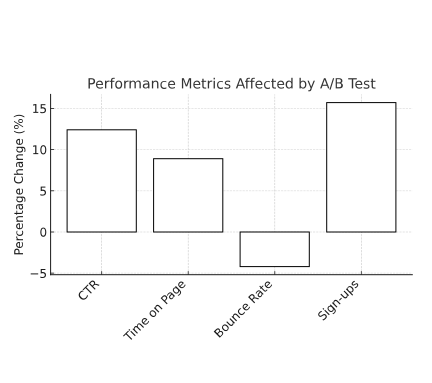
7. Implement, Iterate, and Document
If the variant performed better, implement it—but don’t stop there. Every test offers lessons. Document your findings, revisit your hypothesis, and use what you learned to inform future iterations.
Turning Guesswork into Guidance
The beauty of A/B testing lies in its focus: one question at a time, one change at a time, one insight at a time. Though the method is simple—create two versions, show them to different users, measure what works—the implications can be huge. It grounds decisions in real behavior, not opinions. It replaces assumptions with clarity.
In many organizations, A/B testing becomes part of a feedback loop: one test informs the next, gradually optimizing the user experience over time.
Key Metrics to Track
A/B testing isn’t about guessing which version “feels” better—it’s about proving which one performs better. That’s why choosing and tracking the right metrics is critical. These indicators help determine whether a change made a meaningful impact or if the difference was statistically insignificant.
Here are the most commonly used metrics in A/B testing for UX and UI optimization:
1. Conversion Rate
Arguably the most important metric, especially for marketing, eCommerce, and SaaS interfaces. A conversion can be any desired action: form submission, purchase, signup, or click.
Why it matters: It’s the clearest signal of whether a design variant drives action.
2. Click-Through Rate (CTR)
Used to measure how effective buttons, links, or banners are at generating interaction.
Why it matters: It helps assess visual hierarchy, CTA clarity, and copy effectiveness.
3. Bounce Rate
The percentage of users who land on a page and leave without taking any action.
Why it matters: A high bounce rate could indicate confusion, mismatch in expectations, or lack of engagement.
4. Time on Page
How long users spend on a page before navigating away.
Why it matters: Longer doesn’t always mean better—context matters. For content-heavy pages, more time may suggest engagement; for checkout flows, it might signal friction.
5. Exit Rate
The percentage of users who leave the site from a specific page.
Why it matters: Helps identify weak points in user flows, especially if exits are happening before expected conversions.
6. Scroll Depth
Measures how far down users scroll on a page.
Why it matters: It’s useful for assessing whether content is being seen—or if critical messages are buried too low.
7. Engagement Events
Depending on the test context, this could include:
-
Watching a video
-
Adding to cart
-
Hovering over product features
-
Filtering or sorting a dataset
Why it matters: These are signals of interest and intent beyond clicks and time.
8. Microconversion Rates
These are smaller, goal-aligned actions within a larger funnel—like entering an email or viewing a pricing page.
Why it matters: They reveal how well each part of a user journey is supporting the final goal.
A Note on Interpreting Metrics
One metric alone rarely tells the full story. For example, a test that increases time on page might be good for a blog, but problematic for a product page if it reflects decision paralysis. Always measure in context and consider supporting metrics to validate the insight.
Where possible, pair quantitative data (metrics) with qualitative data (session replays, feedback, or heatmaps) for a fuller picture of why users behave the way they do.

Popular Tools for A/B Testing
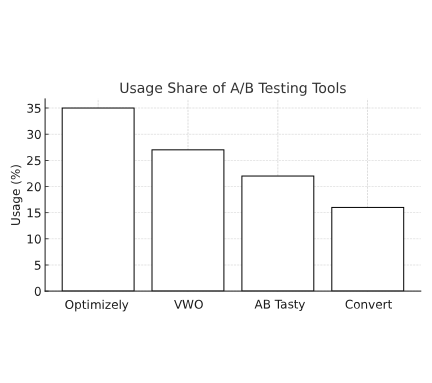
Running a successful A/B test requires more than just a hypothesis and a spreadsheet. The right tools streamline test creation, manage traffic distribution, track metrics, and deliver statistically sound insights. While your tech stack and traffic volume will influence your tool selection, here are some of the most widely used platforms in A/B testing today:
1. Optimizely
A robust experimentation platform favored by enterprise teams. It offers advanced segmentation, real-time targeting, and multivariate testing capabilities.
Best for: Complex testing workflows, product teams, personalization initiatives.
2. VWO (Visual Website Optimizer)
Known for its visual editor and easy setup, VWO is ideal for marketing and design teams who want to test without deep technical involvement.
Best for: Mid-sized teams looking for a no-code testing interface.
3. AB Tasty
A versatile A/B testing and personalization platform designed for marketing and product teams. AB Tasty offers a visual editor, server-side testing, and AI-powered recommendations. It’s well-suited for both simple experiments and advanced behavioral targeting.
Best for: Teams seeking a balance between ease of use and technical flexibility, with built-in personalization and experimentation capabilities.
4. Adobe Target
A powerful, enterprise-grade tool used for A/B testing, personalization, and experience targeting. Deeply integrated into the Adobe Experience Cloud ecosystem.
Best for: Organizations already using Adobe Experience Manager or needing personalized content delivery.
5. Convert
Focused on privacy-first testing, Convert allows for high-volume, high-speed experiments with detailed audience targeting.
Best for: Teams requiring GDPR compliance or privacy-conscious testing.
6. Crazy Egg / Hotjar (Supportive Tools)
While not pure A/B testing platforms, these tools offer heatmaps, scroll tracking, and session recordings. They’re often used before or after tests to observe qualitative behaviors.
Best for: Understanding the “why” behind test results, validating hypotheses, and spotting friction.
7. Native A/B Testing in CMS and E-commerce Platforms
Some systems offer built-in or plug-in testing options:
-
Shopify (via apps like Neat A/B Testing)
-
BigCommerce (via integrations)
-
WordPress (via plugins like Nelio A/B Testing)
-
Webflow (manual split testing with third-party tracking)
Best for: Lightweight testing needs tied to marketing campaigns or page optimizations.
Choosing the Right Tool
When evaluating A/B testing tools, consider:
-
Your team’s technical skills
-
Testing volume and complexity
-
Need for visual editing or code-level control
-
Integration with your analytics, CRM, or CMS
-
Budget and licensing model
Best Practices for Effective A/B Tests
Running an A/B test is easy. Running a good A/B test—the kind that yields clear, actionable insights—is much harder. Without the right structure and controls, even well-intentioned tests can lead to misleading conclusions or wasted effort. These best practices help ensure that your tests are sound, statistically valid, and truly useful to the design process.
1. Test One Variable at a Time
Focus on a single change—like a button label, image, or layout structure—so you can isolate the effect of that change. If multiple elements are altered simultaneously, it becomes impossible to determine which change caused the outcome.
2. Align Your Hypothesis With Business and UX Goals
Your test shouldn’t just be about seeing “what works better.” It should aim to improve a specific outcome: increasing sign-ups, reducing friction in a flow, improving readability, or boosting engagement. Start with a hypothesis that ties directly to a user or business objective.
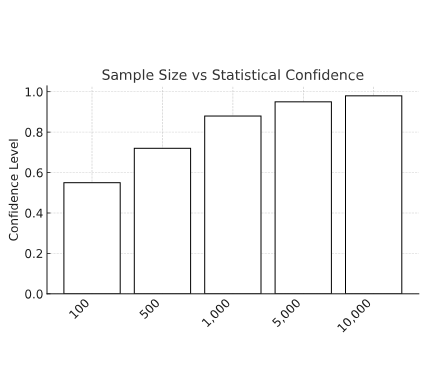
3. Ensure a Large Enough Sample Size
Testing with too few users can lead to false positives or unreliable results. Use a sample size calculator to determine how many participants you need based on your current traffic, conversion rates, and desired confidence level (typically 95%).
4. Let the Test Run Long Enough
Rushing to conclusions is one of the most common A/B testing mistakes. Even if you see early results trending in a certain direction, don’t stop the test prematurely. External variables like time of day, weekday vs. weekend, or marketing traffic surges can skew short-term data.
5. Segment Thoughtfully
Audience segments matter. A test that performs well with new visitors might not perform the same way with returning users. Consider segmenting by traffic source, device type, geography, or behavioral triggers when appropriate.
6. Avoid Mid-Test Changes
Once a test is live, don’t alter the variants, add new variables, or change your tracking setup. Doing so compromises the integrity of the experiment. Wait until the test concludes before making adjustments.
7. Document Every Test
Good testing programs are cumulative. Document your hypothesis, metrics, results, and learnings—even if the variant didn’t “win.” Over time, these records build a valuable internal knowledge base that informs future design and strategy decisions.
8. Consider Seasonality and Traffic Patterns
Launching a test during a holiday sale, major campaign, or slow traffic week can affect the outcome. Always account for external influences, and compare baseline data to contextualize your results.
9. Think Beyond the Win
Even if Variant B doesn’t beat Variant A, you still learn something: maybe your audience prefers simplicity, or maybe there was no problem to fix. A test without a winner isn’t a failure—it’s information.
10. Test Frequently, Not Randomly
Make testing a habit, not a one-off tactic. A consistent, ongoing A/B testing program enables your team to iterate with confidence and make continuous, evidence-backed improvements to the user experience.
The Quiet Power of Incremental Change
A/B testing isn’t just about optimization. It’s about nurturing a mindset of curiosity over ego, where every team member can bring ideas, but the audience makes the final call. In doing so, A/B testing removes politics from design debates and puts trust in the people we’re building for.
Common Pitfalls to Avoid
Even with the best tools and intentions, A/B tests can go wrong if they’re not properly set up, executed, or interpreted. Recognizing these pitfalls helps teams avoid drawing false conclusions—or worse, implementing changes that degrade the user experience.
1. Drawing Conclusions Too Early
Ending a test before reaching statistical significance is one of the most common mistakes. Early trends can reverse as more data comes in. Prematurely acting on these trends can lead to misguided decisions.
Tip: Use a calculator or testing tool to determine the minimum duration and sample size needed before calling a winner.
2. Testing Without a Clear Hypothesis
If you don’t know what you’re testing or why, the results won’t offer meaningful insights. Vague goals like “let’s just see what happens” often lead to inconclusive results or vanity metrics.
Tip: Frame every test with a structured hypothesis tied to a measurable outcome.
3. Making Multiple Changes in a Single Test
Changing several elements at once—such as the headline, image, and CTA—can lead to a positive or negative result, but you won’t know which change caused it.
Tip: Limit tests to one variable at a time, unless you’re conducting a multivariate test with a larger sample size.
4. Ignoring Statistical Significance
Not all differences are meaningful. A small uptick in conversions might seem promising, but without statistical confidence, it could just be noise.
Tip: Use proper statistical methods (frequentist or Bayesian) to validate your outcomes before implementing changes.
5. Overlooking Contextual Factors
Tests can be skewed by concurrent marketing campaigns, external events, or unexpected traffic spikes. If your test runs during an email promotion or seasonal sale, results may not reflect normal user behavior.
Tip: Account for external influences and compare test data to historical performance for context.
6. Not Segmenting Your Results
Looking only at the overall result can mask important differences among user groups. For example, mobile users might prefer one version, while desktop users favor another.
Tip: Analyze performance by segment—device, geography, new vs. returning users—to uncover nuanced insights.
7. Cherry-Picking Data
Looking for a metric that supports your desired outcome, even if the primary goal wasn’t met, can lead to false narratives. This is known as p-hacking or result fishing.
Tip: Stick to your original success metric and evaluate secondary metrics only as supporting evidence.
8. Failing to Act on the Results
A test is only valuable if its outcome is used. Too often, winning variations go unimplemented—or worse, conflicting opinions overrule the data.
Tip: Have a plan in place for what happens after a test ends, including implementation, communication, and documentation.
9. Ignoring Negative or Inconclusive Tests
A test that shows no difference is still valuable. It tells you that the change didn’t matter—or that you need to test something else. Negative results are part of the learning process.
Tip: Log all test outcomes. Over time, even “failures” contribute to pattern recognition and better decisions.
10. Relying on A/B Testing Alone
A/B testing is powerful—but not sufficient on its own. It works best in combination with qualitative research methods, such as usability testing, user interviews, or heatmaps.
Tip: Use A/B testing to validate what works, and other UX methods to understand why it works.
Advanced Methods: Beyond Basic A/B Testing
Once you’ve mastered single-variable tests and built confidence in your experimentation process, it may be time to explore more advanced methods. These approaches allow for greater complexity, personalization, and precision—but also require more careful planning and statistical rigor.
1. Multivariate Testing (MVT)
Unlike traditional A/B testing, which compares one element at a time, multivariate testing evaluates multiple elements and combinations simultaneously. For example, you might test variations in a hero image, CTA button, and headline—measuring how each combination performs.
Use when: You have high traffic volume and want to optimize several UI components in parallel.
Caution: MVT requires exponentially more data than A/B testing and should only be used when you can support large sample sizes.
2. Split URL Testing
Also called redirect tests, these involve sending users to entirely separate URLs—usually with significantly different layouts or structures. This approach is best for testing full-page redesigns or complex experiences.
Use when: You want to compare a new page concept without making changes to the existing design.
Caution: Tracking consistency across URLs and load time differences can impact test accuracy.
3. Sequential Testing
Instead of splitting audiences randomly, this approach tests one version at a time in sequence—typically by week or traffic window. It’s useful in low-traffic environments where traditional A/B testing lacks statistical power.
Use when: You can’t run a simultaneous test due to volume or technical limitations.
Caution: Sequential testing is more vulnerable to time-based external variables (like seasonality or campaign influence).
4. Personalization Testing
In these experiments, different user segments see different variations based on behavior, demographics, or preferences. It combines A/B testing with personalization engines to deliver context-aware experiences.
Use when: You want to deliver more tailored interactions—e.g., new users see a welcome message, while returning users see product updates.
Caution: The more segments you test, the more complex the implementation and tracking become.
5. Server-Side Testing
Traditional (client-side) A/B tests manipulate the UI via JavaScript. Server-side testing happens before the page loads—on the server—making it more stable, secure, and harder to detect by users.
Use when: You need to test core functionality, backend logic, or performance-related experiments.
Caution: Requires developer support and a higher level of technical integration.
6. Bayesian vs. Frequentist Approaches
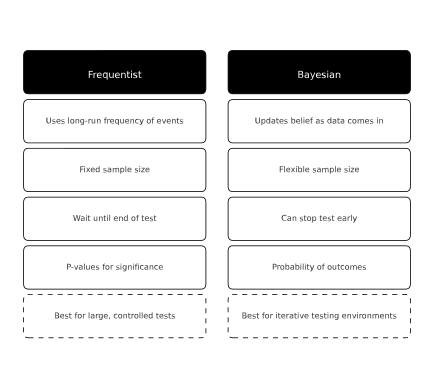
These are two distinct statistical models for interpreting A/B test results.
-
Frequentist methods rely on long-term probabilities and fixed sample sizes (most common).
-
Bayesian methods calculate probability updates as data comes in, offering more flexibility and faster results in some contexts.
Use when: Your team has strong data capabilities and wants to optimize how test outcomes are calculated.
Advanced testing techniques offer more granular insights—but they also raise the stakes. They demand a mature data infrastructure, deeper expertise, and stronger coordination between design, development, and analytics teams.
Real-World Examples
Sometimes the best way to understand the power of A/B testing is to see it in action. The following examples show how design teams have used controlled experiments to solve real UX challenges, validate ideas, and boost performance.
1. Optimizing a Call-to-Action (CTA) Button
Scenario: A SaaS product team suspected their low sign-up rate was due to an underperforming CTA on their homepage.
Test:
-
Variant A (Control): “Start Your Free Trial” in gray
-
Variant B: “Get Started — It’s Free” in a bold blue button
Result: Variant B increased conversions by 22%.
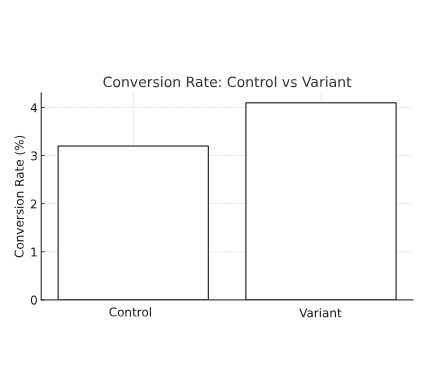
Why it worked: Stronger visual contrast and more inviting language reduced friction and made the offer feel more approachable.
2. Testing Headline Hierarchy on a Landing Page
Scenario: A marketing team noticed that traffic was hitting a product landing page but failing to scroll or engage.
Test:
-
Variant A (Control): Informational headline about product features
-
Variant B: Outcome-driven headline focused on user benefit
Result: Variant B improved engagement time by 17% and boosted CTA clicks by 12%.
Why it worked: Framing the value proposition from the user’s perspective clarified relevance immediately.
3. Streamlining a Checkout Experience
Scenario: An eCommerce site had a noticeable drop-off between the cart and checkout pages.
Test:
-
Variant A (Control): 5-step checkout flow with account login
-
Variant B: 2-step guest checkout with autofill support
Result: Checkout completion rose by 35% with Variant B.
Why it worked: Reducing friction and removing barriers (like forced account creation) led to a more seamless experience.
4. Comparing Visual Hierarchy for Feature Discovery
Scenario: A product team wanted more users to explore a lesser-known feature on their dashboard.
Test:
-
Variant A (Control): Feature buried in a dropdown
-
Variant B: Feature promoted with an icon and label on the main nav bar
Result: Click-through to the feature rose by 60%.
Why it worked: Better visual prominence made the feature discoverable to more users without adding new content.
5. Microcopy Variation in Error States
Scenario: A financial app wanted to reduce abandonment during signup when users entered invalid information.
Test:
-
Variant A (Control): Generic error message: “Invalid input.”
-
Variant B: Clearer message: “Please enter a valid email address so we can send your activation link.”
Result: Form completion rate increased by 14%.
Why it worked: Helpful, specific copy guided the user without creating friction or confusion.
Each of these examples demonstrates how small, focused changes, backed by data and tested in context, can improve usability and business performance. A/B testing isn’t just about design decisions—it’s about understanding users better with every iteration.
When Not to A/B Test
While A/B testing is a powerful tool, it’s not the answer to every UX or business challenge. In some cases, running a test may produce misleading results—or waste valuable time and resources. Knowing when not to A/B test is just as important as knowing when to use it.
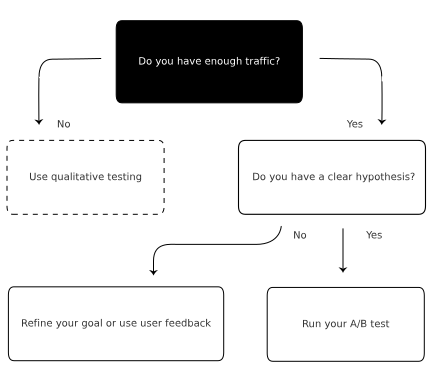
1. When You Don’t Have Enough Traffic
A/B testing relies on a statistically significant sample size to produce valid results. If your site or feature doesn’t generate enough traffic, you won’t be able to run tests long enough to reach trustworthy conclusions.
Instead: Use qualitative methods like usability testing, user interviews, or click tracking to gather insights.
2. When Making Major Design Changes
If you’re launching a complete redesign—new branding, layout, navigation structure—it’s hard to isolate individual variables for testing. A/B testing is best for incremental changes, not for validating broad transformations.
Instead: Conduct moderated usability testing to explore how users interact with the new interface holistically.
3. When You Lack a Clear Hypothesis
Running a test “just to see what happens” without a defined goal leads to inconclusive or misleading results. Testing without intent turns into guesswork.
Instead: Take time to define your objectives and form a hypothesis based on user feedback or analytics patterns.
4. When External Factors Could Skew Results
Major events—like product launches, media coverage, or ad campaigns—can alter user behavior and introduce bias into your test.
Instead: Wait for traffic to stabilize or run the test during a neutral period to ensure data reliability.
5. When Testing for Legal, Ethical, or Safety-Critical Interfaces
In areas like healthcare, finance, or accessibility, testing critical messages or functions may not be appropriate if it risks user trust or well-being.
Instead: Use established standards, regulations, and expert reviews. In these contexts, usability and compliance take precedence over experimentation.
6. When You Can’t Act on the Results
If you lack the capacity to implement a winning variant—due to technical debt, content restrictions, or workflow delays—testing may lead to frustration and lost momentum.
Instead: Align internal stakeholders and resources before launching any experiment. Every test should be actionable.
7. When the Test Would Take Too Long to Matter
If reaching significance would take months due to low interaction or rare conversions, the value of the test diminishes. By the time you reach a result, the context may have changed.
Instead: Run a pilot with directional qualitative feedback, then iterate based on patterns and usability evidence.
A/B testing is not a silver bullet—it’s a focused, tactical method that thrives in the right conditions. The more selective and thoughtful your testing strategy, the more reliable and valuable your results will be.
Getting Started: A/B Testing Readiness Checklist
Before launching your next (or first) A/B test, use this checklist to make sure your team is prepared, aligned, and set up for success. Skipping these steps often leads to wasted time, bad data, or false conclusions.
✅ 1. Define Your Hypothesis
Do you have a clear assumption you’re trying to validate, and do you know why you’re testing this specific change?
Example: “Changing the CTA text from ‘Submit’ to ‘Get My Free Guide’ will increase downloads.”
✅ 2. Choose the Right Metric
Have you selected a primary metric that aligns with your goal—such as conversion rate, click-through rate, or form completion?
Don’t test blindly. Know exactly what success looks like.
✅ 3. Validate Sample Size
Can you realistically reach statistical significance within a reasonable time frame based on your site’s traffic?
Use online calculators to determine whether your test will be valid before you begin.
✅ 4. Select Your Tool
Is your A/B testing platform in place, configured, and integrated with your analytics setup?
Whether it’s VWO, AB Tasty, Optimizely, or a native CMS solution, ensure you know how to set up, track, and analyze the test.
✅ 5. Build and QA Your Variants
Are both your control and variant fully functional, bug-free, and visually consistent across devices?
Errors in the variant can skew results or degrade user trust. Test everything before launch.
✅ 6. Segment Thoughtfully
Do you know who your test audience is, and are you accounting for device types, return vs. new users, or other behavioral segments?
Consistent targeting ensures cleaner data and more reliable insights.
✅ 7. Time the Launch Strategically
Are you running your test during a relatively normal period—not during a campaign spike, holiday surge, or site downtime?
Timing matters. Unusual traffic behavior can taint your results.
✅ 8. Set a Duration Plan
Have you decided how long the test will run—and committed not to check results or stop early?
Impatience kills test integrity. Set a timeline and stick to it.
✅ 9. Assign Roles
Who owns this test? Who will monitor performance, analyze results, and implement the winning variant?
Assign responsibility before the test goes live to avoid confusion later.
✅ 10. Have an Action Plan for Both Outcomes
Whether your variant wins or loses, do you have a plan for what to do next?
Even a failed test gives you data. Document everything and treat it as part of a longer optimization journey.
This lifecycle view captures how the A/B testing process flows in practice—structured yet iterative:
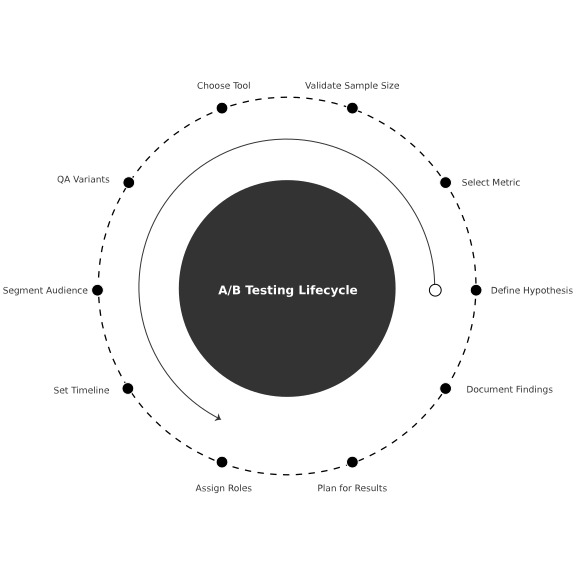
A successful A/B testing program isn’t built on tools—it’s built on consistency, discipline, and curiosity. With the right foundation, each experiment becomes a stepping stone toward better design, stronger user experiences, and smarter decision-making.
Further Reading
A/B testing is one of many tools in the UX and UI optimization toolkit. For a deeper understanding of the principles, methods, and systems that support successful experimentation, explore these related topics:
-
Understand how moderated and unmoderated usability sessions complement A/B testing by uncovering user pain points and behavioral insights.
-
Learn how to track user behavior, define performance metrics, and build the data infrastructure that supports effective experiments.
-
Explore the strategies behind increasing desired user actions—such as purchases, sign-ups, or downloads—across digital touchpoints.
-
Discover how design elements can either guide or confuse users, and how testing can reveal points of friction in your user flows.
-
Go deeper into the design principles that create intuitive, effective, and aesthetically aligned digital experiences.
-
Find out when to test with real users directly and how qualitative feedback rounds out the insights gained from quantitative tests.
Creative Validation in Real Time
When done with care, A/B testing becomes more than a tool—it becomes a mindset rooted in empathy, observation, and continuous improvement. Even failed tests teach us something. They’re not missteps, but lessons in disguise.
In a world of constant iteration and rising expectations, A/B testing reminds us to build with clarity, curiosity, and compassion. Not to replace creativity—but to ensure that our creativity truly resonates.
If you’re building a culture of experimentation—or simply want to make smarter design decisions—A/B testing is an essential tool. But like any methodology, its value lies in how thoughtfully it’s used. By asking the right questions, structuring tests with clarity, and acting on the insights, teams can continuously improve both user satisfaction and business outcomes.
Our published articles are dedicated to the design and the language of design. VERSIONS®, focuses on elaborating and consolidating information about design as a discipline in various forms. With historical theories, modern tools and available data — we study, analyze, examine and iterate on visual communication language, with a goal to document and contribute to industry advancements and individual innovation. With the available information, you can conclude practical sequences of action that may inspire you to practice design disciplines in current digital and print ecosystems with version-focused methodologies that promote iterative innovations.
Related Articles –
-

How to Improve Website Traffic with UX
-

Click Maps and Scroll Maps: Decoding the Invisible User Journey
-

Multivariate Testing: Optimizing UI Through Combinational Insight
-

Understanding the Differences Between UI and UX
-

Alternative Analytics Tools to Understand User Interaction
-

The Science of UX: How Humans Interact with Websites
-

Crafting Words that Shape the User Experience
-

From Basics to Brilliance: User Experience Explained
-

Tracking Metrics for the Success of a Product or Design
-

Understanding Temporal Bias: The Hidden Influence of Timing on Design and Decision-Making